Real screens · Desktop, tablet & mobile web · Demo data
THE CUSTOMER-TO-DELIVERY ROADMAP
One project. Every handoff connected.
This is the process we implement in your business. Follow the customer journey through estimates, payments, design approvals, production, and delivery.
01
CONNECT / STEP 01
Contacts come in.
Every new inquiry starts with a contact. Keep the person, business, and contact details in one shared record.
THE SOFTWARE’S VALUE
Customer information belongs to the business, so the team can pick up the relationship.
ops.usbooths.com Contacts · customer records REAL UI · DEMO DATA
Contacts · customer records · US Booths OpsFictional demo data
Contact received → start a conversation
02
CONNECT / STEP 02
Conversations uncover the work.
Talk with the customer about their space, furniture, timing, and needs. Keep those conversations connected to the contact.
THE SOFTWARE’S VALUE
The team keeps the context that turns an inquiry into a project.
ops.usbooths.com Communications · customer conversation REAL UI · DEMO DATA
Communications · customer conversation · US Booths OpsFictional demo data
A project emerges → create an opportunity
03
SELL / STEP 03
Turn the need into an opportunity.
Create an opportunity from the conversation, then use it as the starting point for the customer’s estimate.
THE SOFTWARE’S VALUE
Sales can follow the project from first interest to a concrete offer.
ops.usbooths.com Opportunities · create an opportunity REAL UI · DEMO DATA
Opportunities · create an opportunity · US Booths OpsFictional demo data
Opportunity created → build the estimate
04
SELL / STEP 04
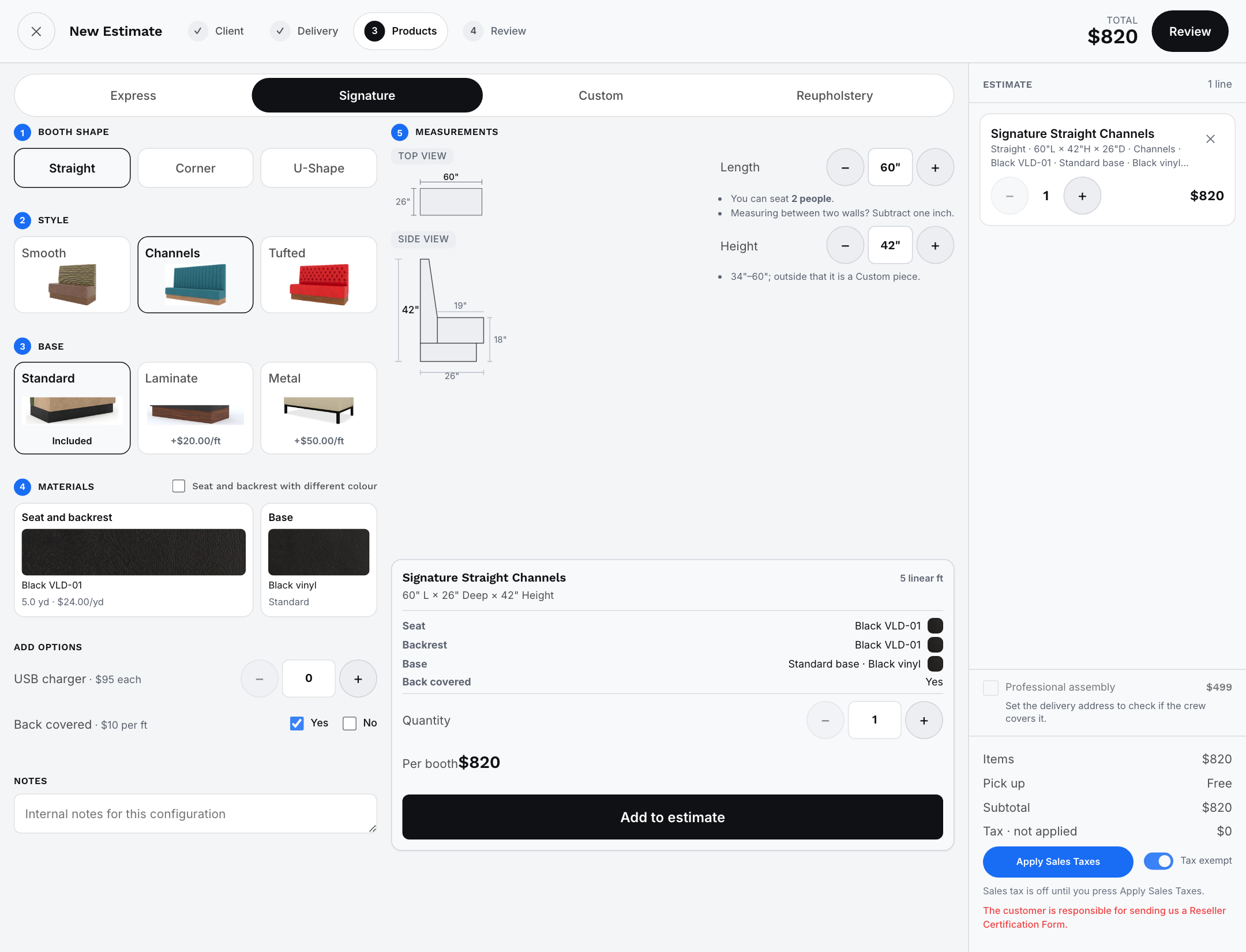
Create and email the estimate.
Build the estimate from the opportunity. Configure the booth, dimensions, materials, and price, then send it to the customer by email.
THE SOFTWARE’S VALUE
A clear scope and price give the customer something they can review and approve online.
INSIDE THE SOFTWARE / SIGNATURE ESTIMATE BUILDER
ops.usbooths.com Estimate Builder · Signature REAL UI · DEMO DATA
Estimate Builder · Signature · US Booths OpsExample booth configuration
Estimate emailed → customer reviews on their phone
05
APPROVE / STEP 05
The customer approves online.
The customer opens the email link on their phone or computer, reviews the estimate on the website, and approves it online.
THE SOFTWARE’S VALUE
Approval moves the sale forward without printed paperwork or a trip to the shop.
ops.usbooths.com Sales & estimates REAL UI · DEMO DATA
Sales & estimates · US Booths OpsFictional demo data
Estimate approved → system sends the payment request
06
PAY / STEP 06
Collect the initial payment.
After estimate approval, the system sends the payment request. The customer pays online, and the order moves into design.
THE SOFTWARE’S VALUE
The payment connects the approved sale to the next stage of work.
ops.usbooths.com Order · initial payment and balance REAL UI · DEMO DATA
Order · initial payment and balance · US Booths OpsFictional demo data
Your designers build the 3D proposal for the order, showing the furniture, dimensions, layout, and materials for customer review.
THE SOFTWARE’S VALUE
The customer can review what will be built before production starts.
ops.usbooths.com Proposal · real 3D furniture design REAL UI · DEMO DATA
Proposal · real 3D furniture design · US Booths OpsFictional demo data
3D proposal prepared → send it to the customer
08
APPROVE / STEP 08
Approve the 3D proposal online.
Send the proposal to the customer by email. They open it on the website and approve the design online. The approved order then moves to production.
THE SOFTWARE’S VALUE
Sales, design, and the shop work from the proposal the customer approved.
my.usbooths.com Customer page · approve the proposal REAL UI · DEMO DATA
Customer page · approve the proposal · US Booths OpsFictional demo data
3D proposal approved → order enters production
09
BUILD / STEP 09
Build from the approved proposal.
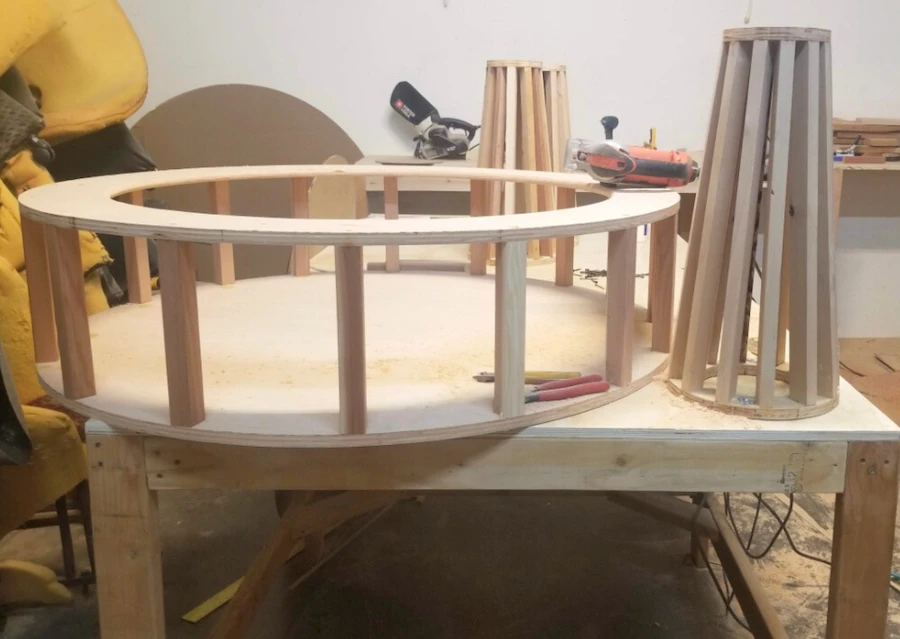
The production team sees the orders and their proposals, builds the furniture, and uploads photos every day to document progress.
THE SOFTWARE’S VALUE
Daily photos make progress visible alongside the instructions the team is building from.
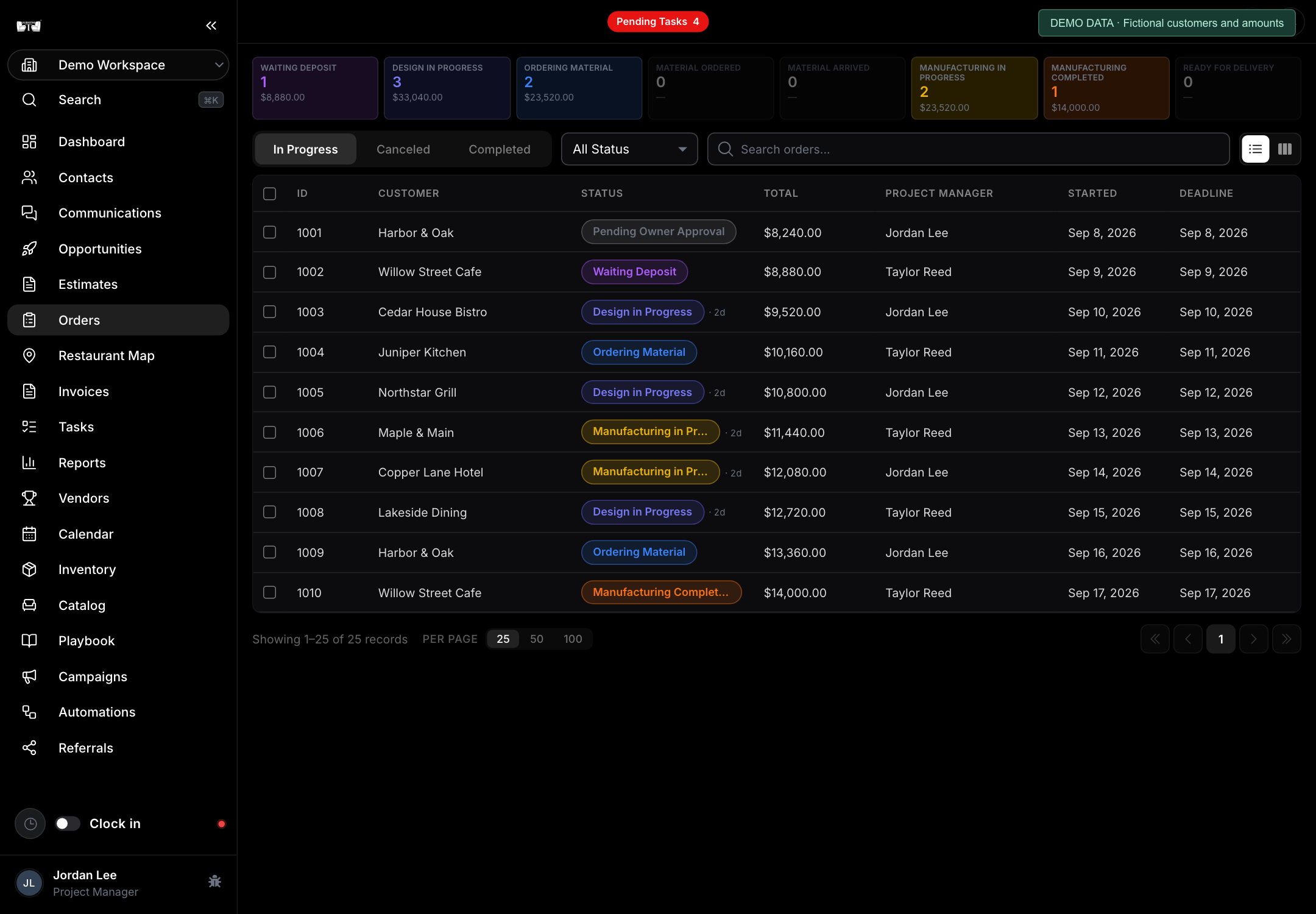
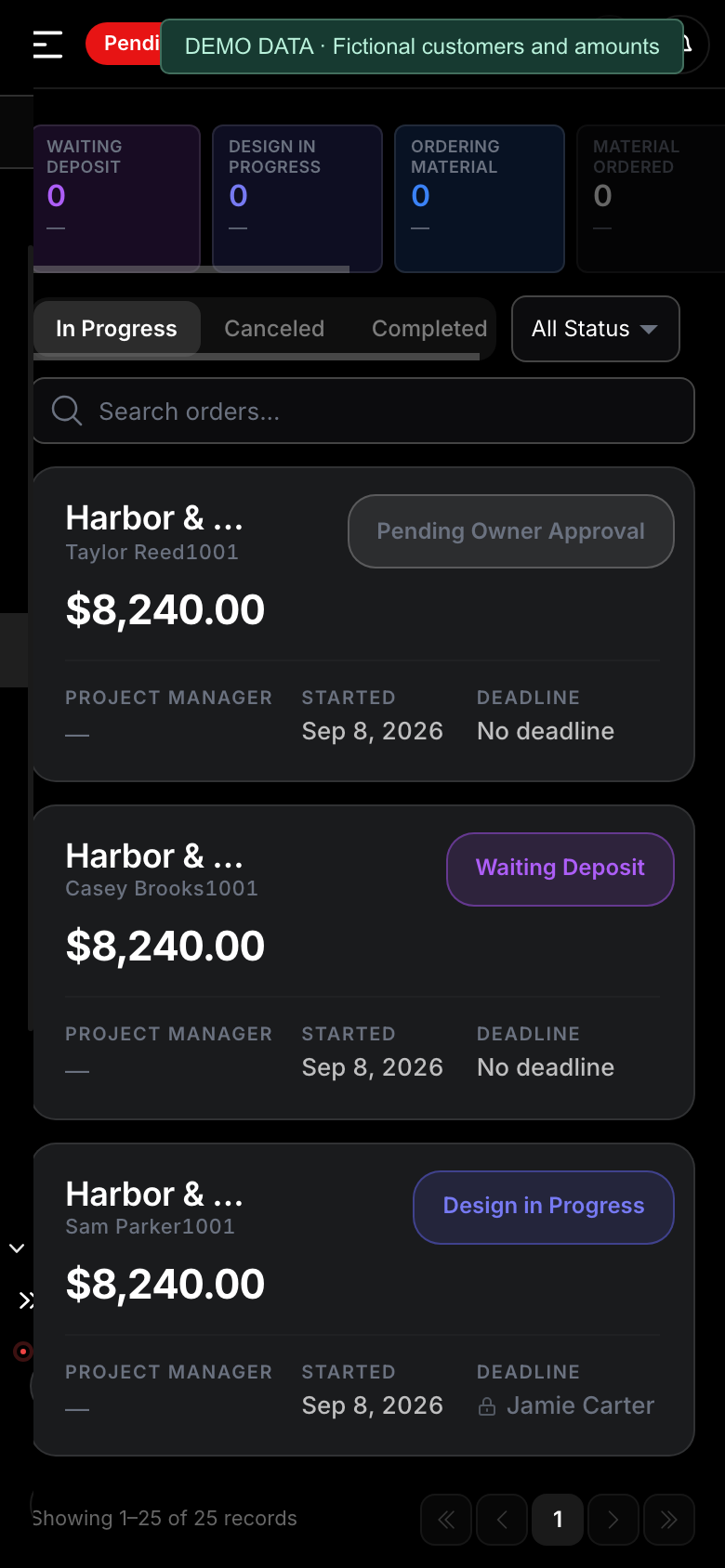
ops.usbooths.com Orders & production REAL UI · DEMO DATA
Orders & production · US Booths OpsFictional demo data
Production complete → mark the order finished
10
COMPLETE / STEP 10
Finished work triggers the final invoice.
The team marks the order as completed. That action sends the final invoice to the customer for the remaining payment.
THE SOFTWARE’S VALUE
The production milestone triggers the next billing step instead of waiting for someone to chase it.
ops.usbooths.com Invoices · payment status REAL UI · DEMO DATA
Invoices · payment status · US Booths OpsFictional demo data
Order marked completed → final invoice sent
11
PAY / STEP 11
Final payment releases the order.
The customer pays the final invoice. Once paid, the order moves to Ready for delivery.
THE SOFTWARE’S VALUE
The team can distinguish finished furniture from orders that are paid and ready to go.
ops.usbooths.com Order · payment history and zero balance REAL UI · DEMO DATA
Order · payment history and zero balance · US Booths OpsFictional demo data
Final payment received → Ready for delivery
12
DELIVER / STEP 12
Coordinate and deliver.
Use the shared calendar to coordinate the delivery with your team, then deliver the finished order to the customer.
THE SOFTWARE’S VALUE
Everyone can see the schedule and coordinate the final handoff.
ops.usbooths.com Calendar · scheduling REAL UI · DEMO DATA
Calendar · scheduling · US Booths OpsFictional demo data
Ready for delivery → delivered to the customer
EXPLORE THE ACTUAL SOFTWARE
The screens behind the process.
When the details live in messages, spreadsheets, and someone’s memory, your team spends its day asking for updates. Put the work in one place.
01 / WIN THE WORK
Keep the conversation moving.
Give every opportunity a clear next step. Keep customer details, conversations, and estimates together so the handoff starts with the right information.
ops.usbooths.com Materials & inventory REAL UI · DEMO DATA
Materials & inventory · US Booths OpsFictional demo data
Materials in view
A shared reference for the shop.
SUPPORTING EVERY STAGE
One team. A shared working day.
The project moves through stages. These tools keep everyone coordinated across the entire process.
01 / SHARED CALENDAR
Everyone sees the plan.
Coordinate design, production, and deliveries with an internal calendar the whole team can see.
02 / COMMUNICATIONS
Keep people connected.
Use internal communication for employees and customer communication to keep the team and the client in the loop.
03 / CLOCK-IN
See time worked.
Employees clock in, and the business can see the time they work.
04 / MOBILE APP
Bring the system with you.
Use the mobile app alongside desktop and tablet access, keeping the software close to the work.
THE CRAFT IS PERSONAL. THE PROCESS SHOULD BE SHARED.
BUILT FOR THE BUSINESS BEHIND THE CRAFT
Your shop has its own rhythm. We get it.
Material choices. Custom dimensions. Changing scopes. A production team that needs the details before the work begins.
We implement the restaurant booth manufacturing workflow inside your business, giving your team a shared system to sell, design, build, and deliver.
Restaurant booth manufacturingConnected team workflowBusiness implementation
BEFORE YOU GET STARTED
A clear next step. No guesswork.
Explore the real workflow above. Then review the plan for bringing it into your business.
Who is this system for?+
Restaurant booth manufacturers and upholstery shops that want to connect sales, design, production, and delivery in one shared system.
What are we implementing?+
The US Booths restaurant booth manufacturing workflow inside your business: contacts, conversations, opportunities, estimates, online approvals, order payments, 3D proposals, production updates, and delivery coordination.
Are these real software screens?+
Yes. The screenshots show the US Booths software, with demonstration customer names and amounts. The 3D proposal shows an actual furniture design. Tap any screen to inspect the details.
What happens after I choose a plan?+
Choose your plan on Tapiceros del Mundo. For a paid membership, review and pay through Stripe, then create your password or use your existing account. If you need help setting up your workshop, send our team a separate request below.
Will I be charged when I sign up?+
Browsing plans and sending an inquiry are free. A paid membership starts only when you confirm payment in Stripe, where you can review the total and subscription terms.
ONE ACCOUNT. YOUR NEXT STEP.
Choose the plan that fits your work.
Compare Free, Pro and Business on Tapiceros del Mundo. Use the same account for Frame Studio and US Booths Tech.